Claude Agent Skills: A First Principles Deep Dive
Original article: Claude Agent Skills: A First Principles Deep Dive
Adapted and translated from: ChallengeHub
What Are Skills?
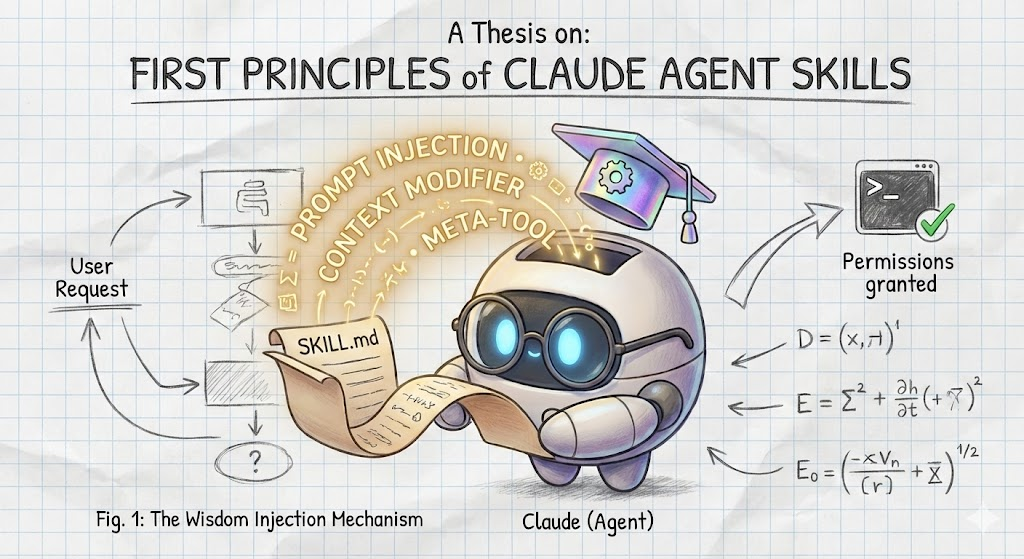
The first principles of Claude Agent Skills can be summarized as: Prompt-based Dynamic Context Injection & Meta-Tool Architecture.
Simply put, Claude’s Skills are not executable code running outside the model (like a Python function). They are high-level instructions (prompts) that get “injected” into the model’s context on demand.
1. The Essence: “Prompt Extension”, Not “Code Execution”
- Traditional view: Tool/Function Calling means “the model calls an external function, the function runs code and returns a result.”
- How Skills work: A Skill is a Markdown file (
SKILL.md). When a Skill is invoked, the system reads this file and “expands” and “injects” its instructions, workflow, and knowledge into the current conversation history. - One-line summary: A Skill doesn’t solve the problem directly — it turns Claude into an expert at solving that problem by injecting a prompt.
2. Architecture: Meta-Tool & Pure LLM Reasoning
- Meta-Tool design: Claude’s prompt doesn’t contain the specific instructions for every Skill. It has a single meta-tool called
Skill. - Progressive Disclosure:
- Claude only sees the name and brief description of each Skill.
- Claude relies entirely on its own language understanding to judge whether the user’s intent matches a Skill.
- There is no hardcoded routing, regex, or classifier. The decision happens purely in the Transformer’s forward pass.
3. Core Mechanism: Dual Context Injection
When a Skill is selected, it performs two layers of “modification”:
A. Conversation Context Injection
- Explicit message (Metadata): Visible to the user — e.g.,
<command-message>The "pdf" skill is loading</command-message>. - Hidden message (Meta-Prompt): Marked with
isMeta: true, contains the fullSKILL.mdcontent, hidden from the user interface.
B. Execution Context Modification
- Tool permissions: Temporarily grants specific tool access (e.g.,
allowed-tools: "Bash(git:*)"). - Model switching: Some Skills can force a model switch (e.g., from Sonnet to Opus).
4. How It Works End-to-End
- User request: “Analyze this PDF for me.”
- LLM decision: Seeing the
pdfskill description in theSkilltool, decides to invokecommand: "pdf". - System intervention: Reads
pdf/SKILL.md, generates the user-visible message and the hidden detailed instructions, modifies session permissions. - LLM execution: Armed with the newly injected context and newly granted permissions, Claude begins the actual task.
How Are Skills Different from Prompts?
| Feature | Traditional Prompts | Claude Agent Skills |
|---|---|---|
| Core mechanism | Static setup, loaded once | Dynamic injection, loaded on demand |
| Location | System prompt or initial message | Hidden inside the Skill meta-tool description |
| Context footprint | Large up front, grows with capabilities | Small up front, temporarily expands only when activated |
| Capability scope | Changes only conversation content and guidelines | Changes conversation content + modifies execution permissions / switches model |
| Visibility | Typically a single channel | Dual-channel: user sees the summary, AI sees the full instructions |
An analogy:
- Traditional prompts: Like a general practitioner who memorized a thick medical handbook before starting work.
- Agent Skills: Like a GP who knows when to call in specialists — normally carrying only a thin contact directory, calling in the right expert when needed.
Overview of Claude Agent Skills
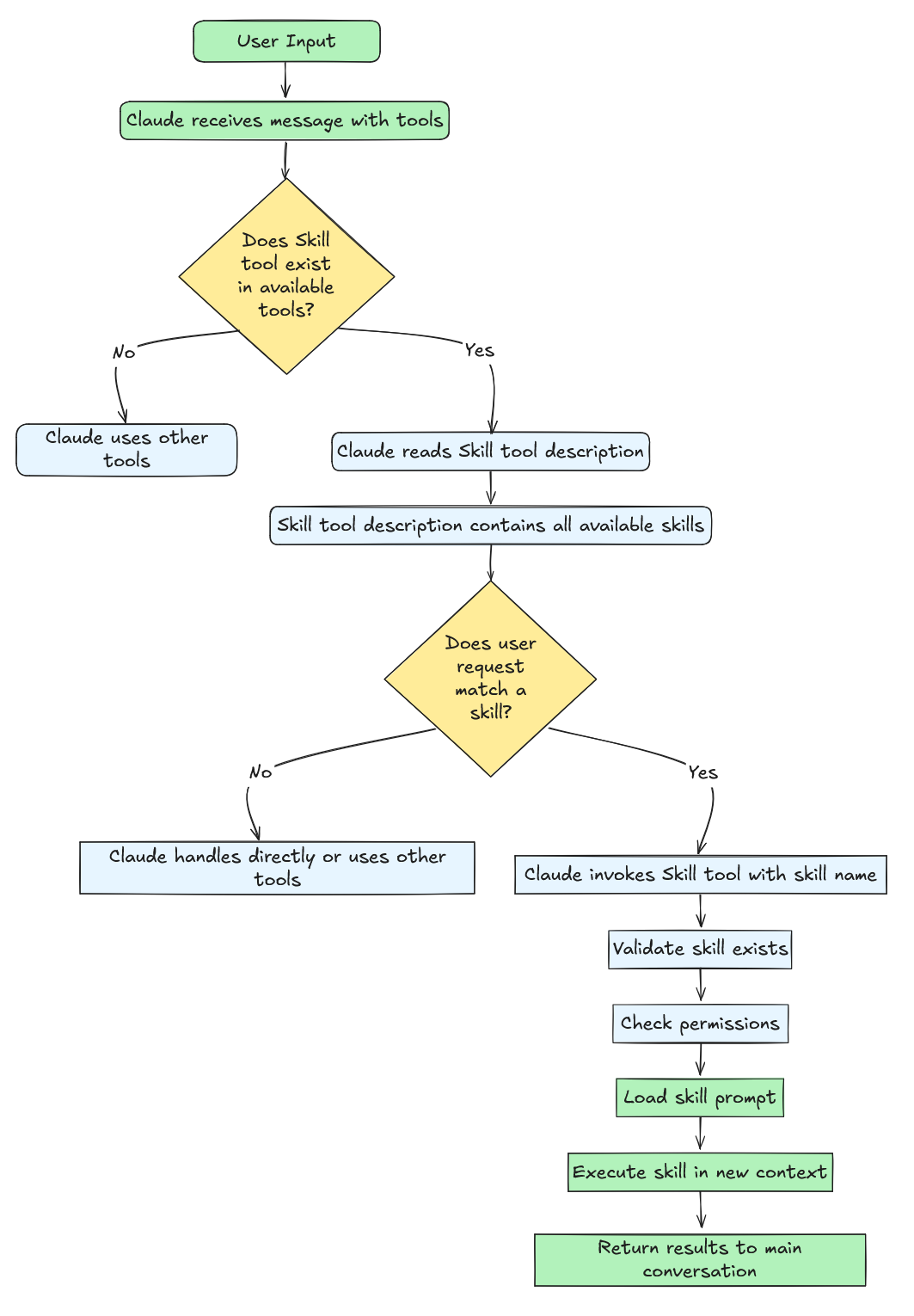
Skills are specialized prompt templates that inject domain-specific instructions into the conversation context.
Terminology:
- Skills tool (capitalized) = the meta-tool that manages all Skills
- skill (lowercase) = an individual skill, such as
pdforskill-creator
Tools vs. Skills
| Aspect | Traditional Tools | Skills |
|---|---|---|
| Execution model | Synchronous, direct | Prompt extension |
| Purpose | Execute a specific action | Guide complex workflows |
| Return value | Immediate result | Context + execution environment change |
| Examples | Read, Write, Bash | pdf, skill-creator |
Building Agent Skills
Key insight: Skills = Prompt template + Conversation context injection + Execution context modification + Optional scripts/resources
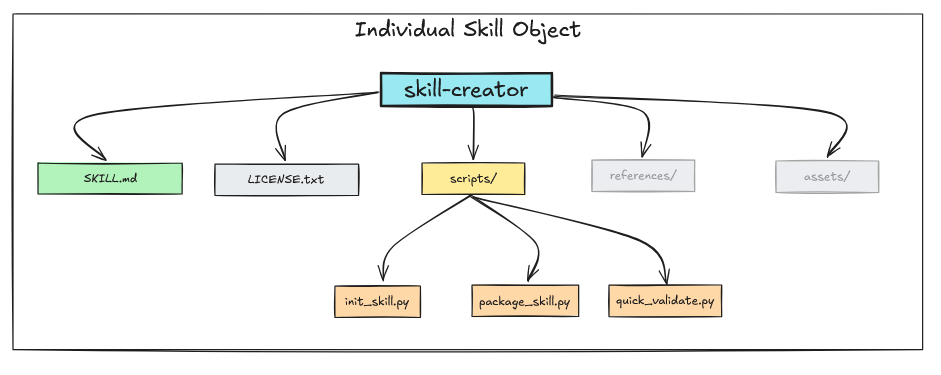
Each Skill is defined in a SKILL.md file and may optionally include:
/scripts— executable scripts/references— reference documentation/assets— templates and binary files
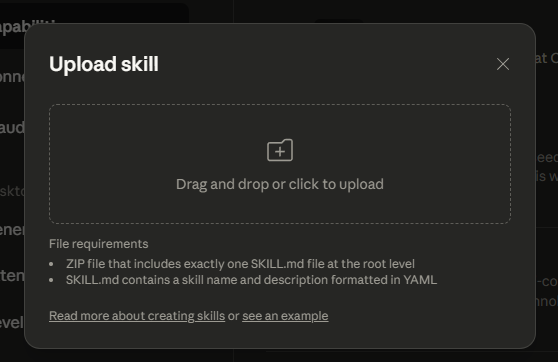
SKILL.md Structure
┌─────────────────────────────────────┐
│ 1. YAML Frontmatter (metadata)      │
│    ---                              │
│    name: skill-name                 │
│    description: brief overview      │
│    allowed-tools: "Bash, Read"      │
│    ---                              │
├─────────────────────────────────────┤
│ 2. Markdown Content (instructions)  │
│    Purpose, detailed instructions,  │
│    examples, steps                  │
└─────────────────────────────────────┘
Frontmatter Fields

- name (required): The Skill’s name, used as the
command - description (required): A functional overview — the primary signal Claude uses to decide when to invoke the Skill
- allowed-tools (optional): Tools that can be used without user approval
- model (optional): Specify which model to use
# ✅ Good practice
allowed-tools: "Read,Write,Bash(git:*)"

# ❌ Unnecessary attack surface
allowed-tools: "Bash,Read,Write,Edit,Glob,Grep,WebSearch,Task,Agent"
Common Skill Patterns
Pattern 1: Script Automation

Offload computation to Python or Bash scripts in the scripts/ directory.
Pattern 2: Read-Process-Write
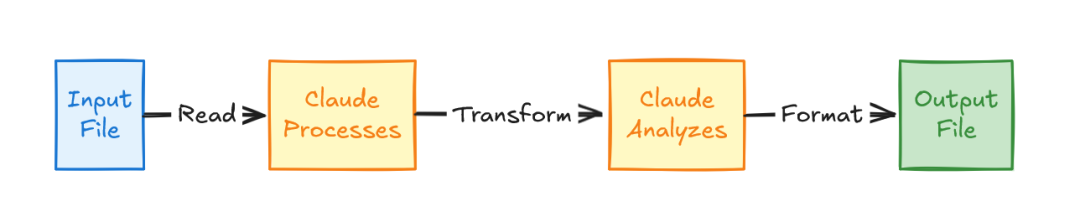
The simplest pattern — read input, transform according to instructions, write output.
Pattern 3: Search-Analyze-Report
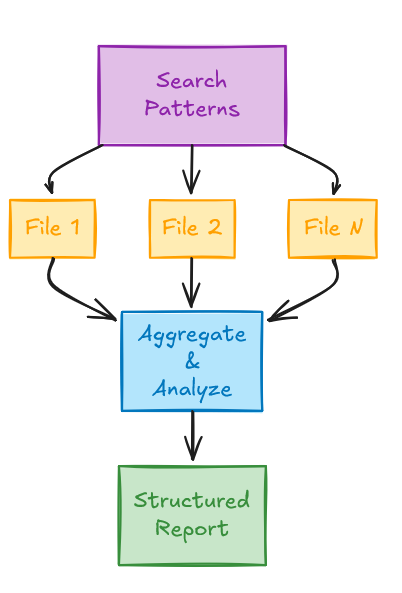
Use Grep to search for patterns, read matching files, analyze findings, generate a report.
Pattern 4: Command Chain Execution
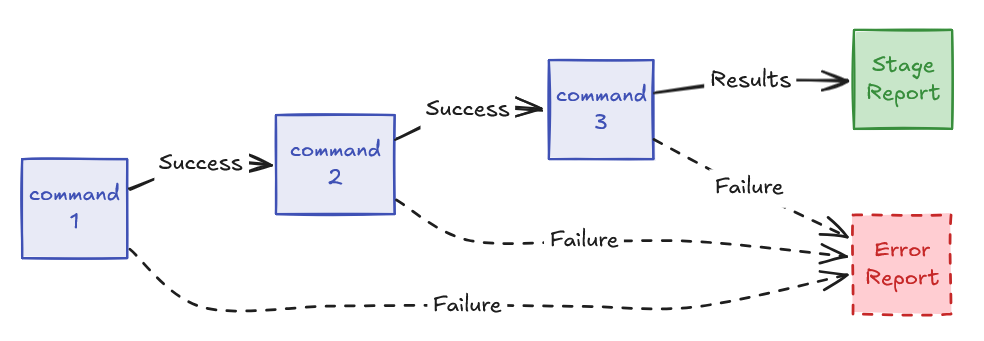
Execute a sequence of commands where each step depends on the previous step’s success.
Skills Internal Architecture
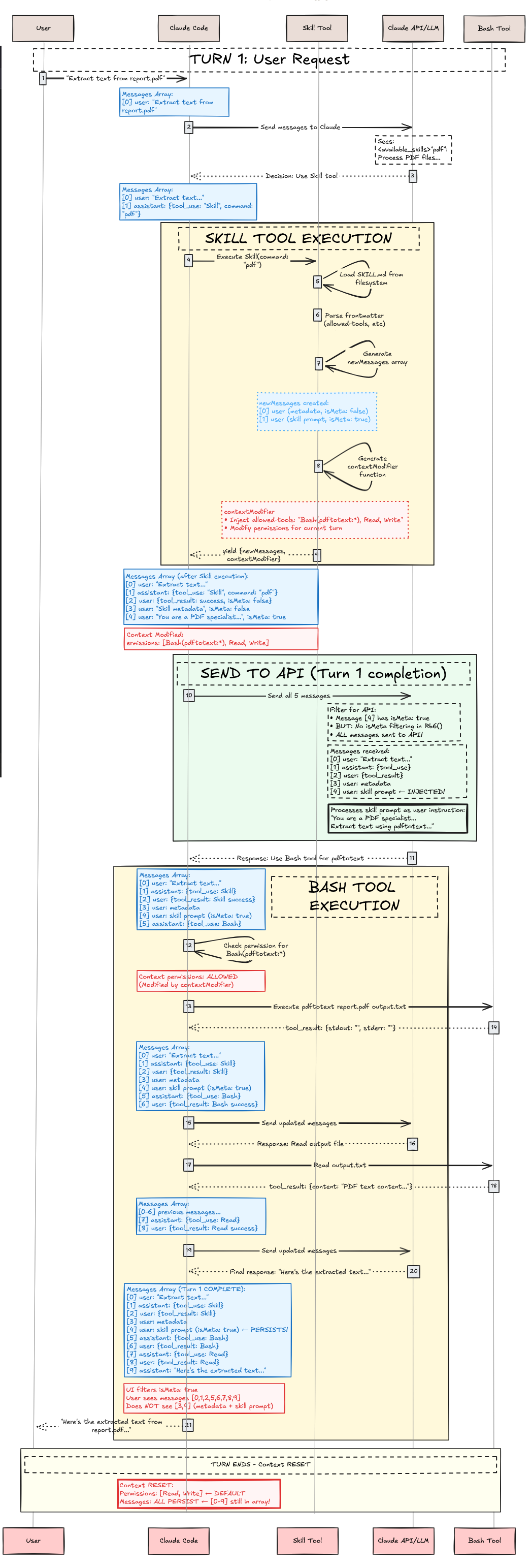
| Feature | Regular Tool | Skills Tool |
|---|---|---|
| Nature | Direct action executor | Prompt injector + context modifier |
| Complexity | Simple (3–4 messages) | Complex (5–10+ messages) |
| Context | Static | Dynamic (modified each turn) |
| Token overhead | ~100 tokens | ~1,500+ tokens |
Why Two Messages?
- Message 1 (
isMeta: false): User-facing transparency - Message 2 (
isMeta: true): Detailed instructions for Claude
Execution Lifecycle
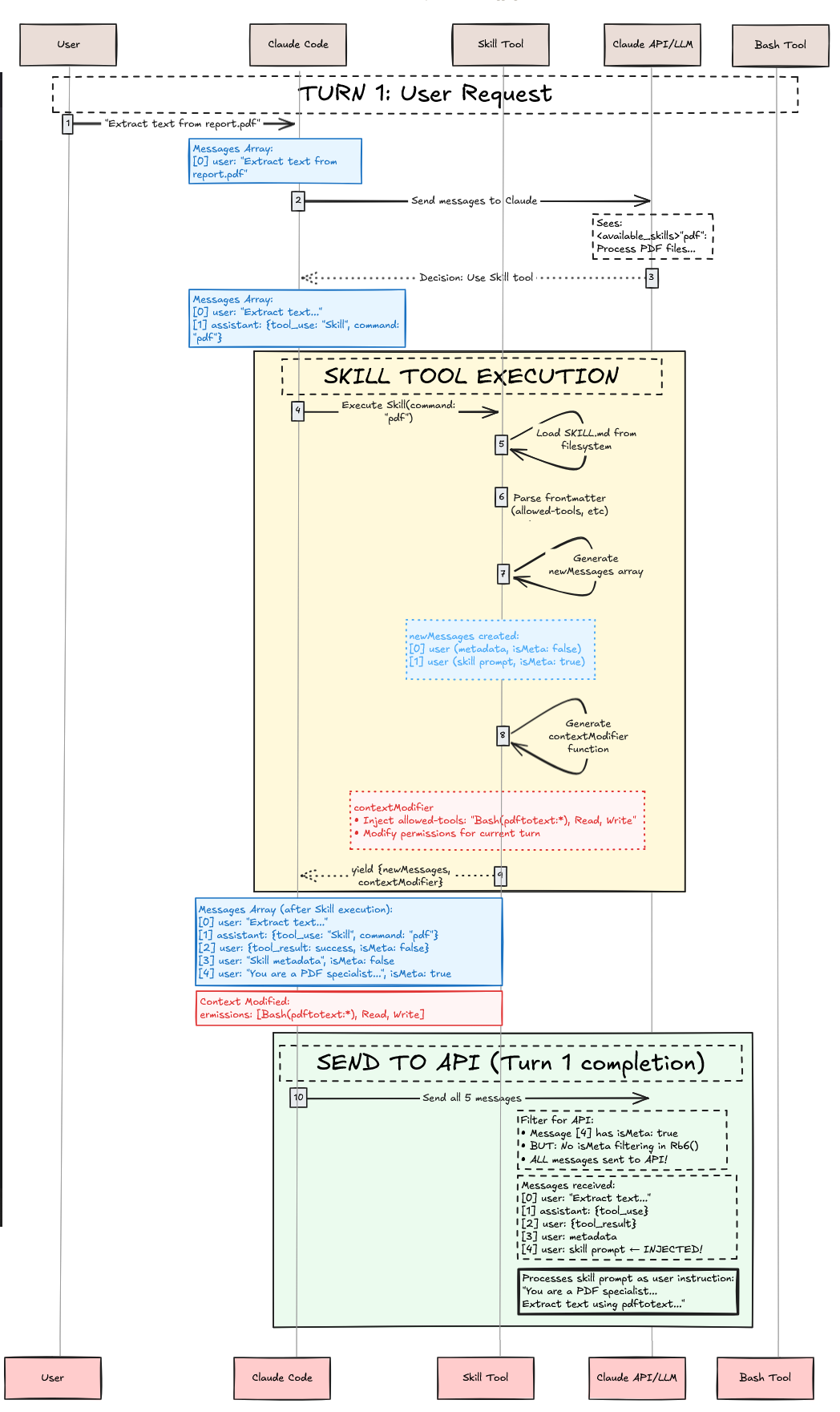
- Discovery & loading: Scans
~/.claude/commands/,.claude/skills/, plugins, and built-in Skills - User request & selection: Claude matches user intent against Skill descriptions
- Skill execution: Validate → permission check → load files → inject context
Summary
The first principle of Claude Agent Skills is dynamically transforming a “static knowledge file (Markdown)” into a “dynamic conversation context (Prompt)” through a “meta-tool”.
Key takeaways:
- Skills are prompt templates, not executable code
- Progressive disclosure ensures context efficiency
- Dual context injection modifies both conversation and execution environment simultaneously
- Meta-tool architecture enables flexible Skill management
This design cleverly leverages the In-Context Learning capability of LLMs to achieve unlimited, on-demand feature expansion.
